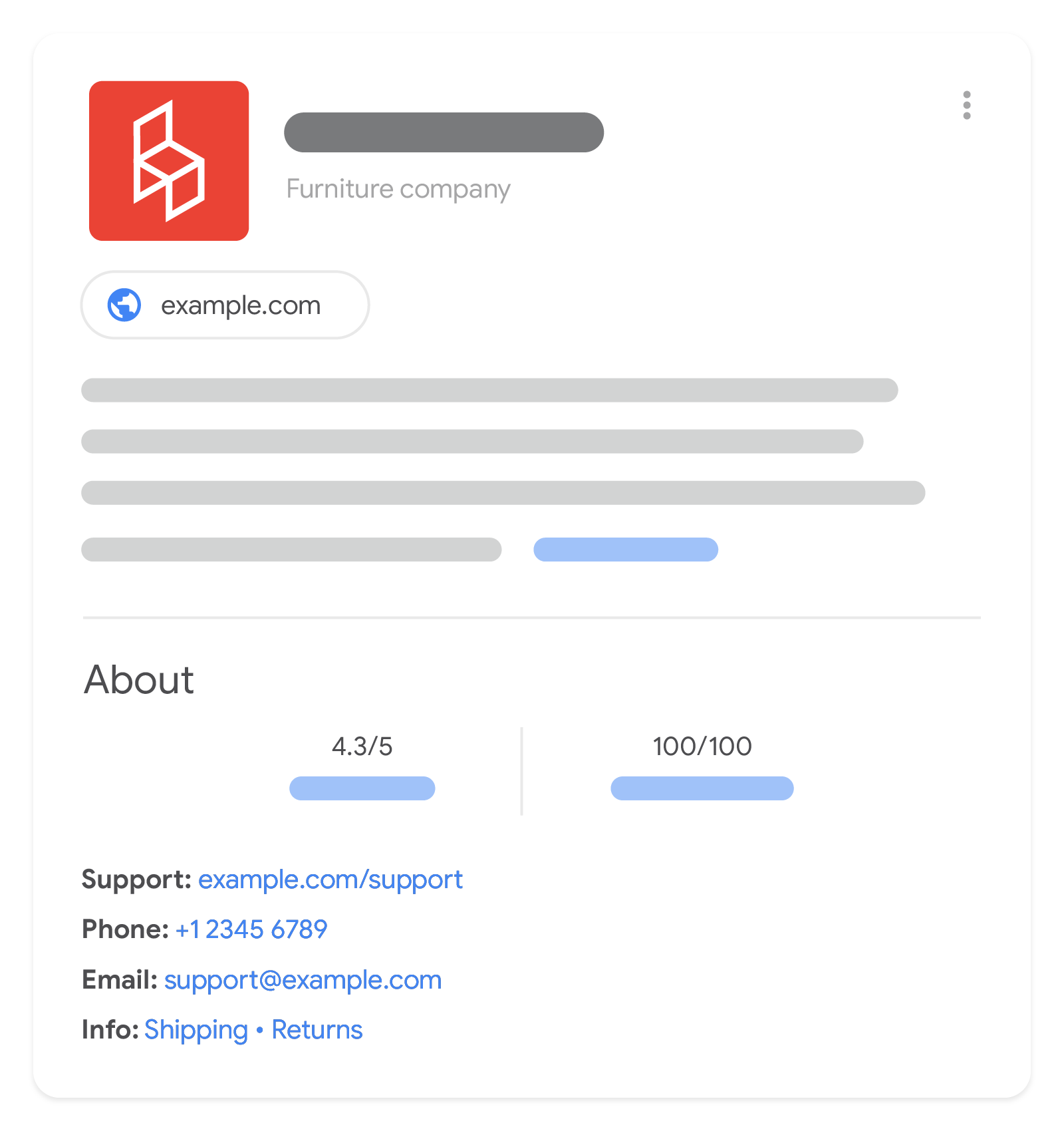
 Merchant knowledge panel in Google Search results
Adding organization structured data to your home page can help Google better understand your organization's administrative details and disambiguate your organization in search results. Some properties are used behind the scenes to disambiguate your organization from other organizations (like iso6523 and naics), while others can influence visual elements in Search results (such as which logo is shown in Search results and your knowledge panel). If you're a merchant, you can influence more details in your merchant knowledge panel and brand profile, such as return policy, address, and contact information. There are no required properties; instead, we recommend adding as many properties that are relevant to your organization.
How to add structured data
Structured data is a standardized format for providing information about a page and classifying the page content. If you're new to structured data, you can learn more about how structured data works.
Here's an overview of how to build, test, and release structured data.
- Add as many recommended properties that apply to your web page. There are no required properties; instead, add the properties that apply to your content. Based on the format you're using, learn where to insert structured data on the page.
- Follow the guidelines.
- Validate your code using the Rich Results Test and fix any critical errors. Consider also fixing any non-critical issues that may be flagged in the tool, as they can help improve the quality of your structured data (however, this isn't necessary to be eligible for rich results).
- Deploy a few pages that include your structured data and use the URL Inspection tool to test how Google sees the page. Be sure that your page is accessible to Google and not blocked by a robots.txt file, the
noindextag, or login requirements. If the page looks okay, you can ask Google to recrawl your URLs. - To keep Google informed of future changes, we recommend that you submit a sitemap. You can automate this with the Search Console Sitemap API.
Examples
Organization
Here's an example of organization information in JSON-LD code.
<html>
  <head>
    <title>About Us</title>
    <script type="application/ld+json">
    {
      "@context": "https://schema.org",
      "@type": "Organization",
      "url": "https://www.example.com",
      "sameAs": ["https://example.net/profile/example1234", "https://example.org/example1234"],
      "logo": "https://www.example.com/images/logo.png",
      "name": "Example Corporation",
      "description": "The example corporation is well-known for producing high-quality widgets",
      "email": "contact@example.com",
      "telephone": "+47-99-999-9999",
      "address": {
        "@type": "PostalAddress",
        "streetAddress": "Rue Improbable 99",
        "addressLocality": "Paris",
        "addressCountry": "FR",
        "addressRegion": "Ile-de-France",
        "postalCode": "75001"
      },
      "vatID": "FR12345678901",
      "iso6523Code": "0199:724500PMK2A2M1SQQ228"
    }
    </script>
  </head>
  <body>
  </body>
</html>

<html>
<head>
<title>About Us</title>
<script type="application/ld+json">
{
"@context": "https://schema.org",
"@type": "Organization",
"url": "https://www.example.com",
"sameAs": ["https://example.net/profile/example1234", "https://example.org/example1234"],
"logo": "https://www.example.com/images/logo.png",
"name": "Example Corporation",
"description": "The example corporation is well-known for producing high-quality widgets",
"email": "contact@example.com",
"telephone": "+47-99-999-9999",
"address": {
"@type": "PostalAddress",
"streetAddress": "Rue Improbable 99",
"addressLocality": "Paris",
"addressCountry": "FR",
"addressRegion": "Ile-de-France",
"postalCode": "75001"
},
"vatID": "FR12345678901",
"iso6523Code": "0199:724500PMK2A2M1SQQ228"
}
</script>
</head>
<body>
</body>
</html>OnlineStore (subtype of Organization) with a shipping policy and return policy
Here's an example of an online store with both a shipping policy and a return policy in JSON-LD code.
Refer to the separate Merchant return policy markup documentation for more examples and detailed information for merchant-level standard return policies.
<html> <head> <title>About Us</title> <script type="application/ld+json"> { "@context": "https://schema.org", "@type": "OnlineStore", "name": "Example Online Store", "url": "https://www.example.com", "sameAs": [ "https://example.net/profile/example12", "https://example.org/@example34" ], "logo": "https://www.example.com/assets/images/logo.png", "contactPoint": { "contactType": "Customer Service", "email": "support@example.com", "telephone": "+47-99-999-9900" }, "vatID": "FR12345678901", "iso6523Code": "0199:724500PMK2A2M1SQQ228", "hasShippingService": [ { "@type": "ShippingService", "name": "shipping to CH and FR", "description": "Shipping to CH 5% of order value, shipping to FR always free", "fulfillmentType": "FulfillmentTypeDelivery", "shippingConditions": [ { "@type": "ShippingConditions", "shippingOrigin": { "@type": "DefinedRegion", "addressCountry": "FR" }, "shippingDestination": { "@type": "DefinedRegion", "addressCountry": "CH" }, "shippingRate": { "@type": "ShippingRateSettings", "orderPercentage": "0.05" } }, { "@type": "ShippingConditions", "shippingOrigin": { "@type": "DefinedRegion", "addressCountry": "FR" }, "shippingDestination": { "@type": "DefinedRegion", "addressCountry": "FR" }, "shippingRate": { "@type": "MonetaryAmount", "value": "0", "currency": "EUR" } } ] } ], "hasMerchantReturnPolicy": { "@type": "MerchantReturnPolicy", "applicableCountry": [ "FR", "CH" ], "returnPolicyCountry": "FR", "returnPolicyCategory": "https://schema.org/MerchantReturnFiniteReturnWindow", "merchantReturnDays": 60, "returnMethod": "https://schema.org/ReturnByMail", "returnFees": "https://schema.org/FreeReturn", "refundType": "https://schema.org/FullRefund" } // Other Organization-level properties //... } </script> </head> <body> </body> </html>

<html>
  <head>
    <title>About Us</title>
    <script type="application/ld+json">
      {
        "@context": "https://schema.org",
        "@type": "OnlineStore",
        "name": "Example Online Store",
        "url": "https://www.example.com",
        "sameAs": [
          "https://example.net/profile/example12",
          "https://example.org/@example34"
        ],
        "logo": "https://www.example.com/assets/images/logo.png",
        "contactPoint": {
          "contactType": "Customer Service",
          "email": "support@example.com",
          "telephone": "+47-99-999-9900"
        },
        "vatID": "FR12345678901",
        "iso6523Code": "0199:724500PMK2A2M1SQQ228",
        "hasShippingService": [
          {
            "@type": "ShippingService",
            "name": "shipping to CH and FR",
            "description": "Shipping to CH 5% of order value, shipping to FR always free",
            "fulfillmentType": "FulfillmentTypeDelivery",
            "shippingConditions": [
              {
                "@type": "ShippingConditions",
                "shippingOrigin": {
                  "@type": "DefinedRegion",
                  "addressCountry": "FR"
                },
                "shippingDestination": {
                  "@type": "DefinedRegion",
                  "addressCountry": "CH"
                },
                "shippingRate": {
                  "@type": "ShippingRateSettings",
                  "orderPercentage": "0.05"
                }
              },
              {
                "@type": "ShippingConditions",
                "shippingOrigin": {
                  "@type": "DefinedRegion",
                  "addressCountry": "FR"
                },
                "shippingDestination": {
                  "@type": "DefinedRegion",
                  "addressCountry": "FR"
                },
                "shippingRate": {
                  "@type": "MonetaryAmount",
                  "value": "0",
                  "currency": "EUR"
                }
              }
            ]
          }
        ],
        "hasMerchantReturnPolicy": {
          "@type": "MerchantReturnPolicy",
          "applicableCountry": [
            "FR",
            "CH"
          ],
          "returnPolicyCountry": "FR",
          "returnPolicyCategory": "https://schema.org/MerchantReturnFiniteReturnWindow",
          "merchantReturnDays": 60,
          "returnMethod": "https://schema.org/ReturnByMail",
          "returnFees": "https://schema.org/FreeReturn",
          "refundType": "https://schema.org/FullRefund"
        }
        // Other Organization-level properties
        // ...
      }
    </script>
  </head>
  <body>
  </body>
</html>
Guidelines
You must follow these guidelines to enable structured data to be eligible for inclusion in Google Search results.
- Technical guidelines
- Search Essentials
- General structured data guidelines
Technical guidelines
We recommend placing this information on your home page, or a single page that describes your organization, for example the about us page. You don't need to include it on every page of your site.
We recommend using the most specific schema.org subtype of Organization that matches your organization. For example, if you have an ecommerce site, then we recommend using the OnlineStore subtype instead of OnlineBusiness. And if your site is about a local business, for example a restaurant or a physical store, then we recommend providing your administrative details using the most specific subtype(s) of LocalBusiness and following the required and recommended fields for Local business in addition to the fields recommended in this guide.
Structured data type definitions
Google recognizes the following properties of an Organization. To help Google better understand your page, include as many recommended properties that apply to your web page. There are no required properties; instead, add the properties that apply to your organization.
| Recommended properties | |
|---|---|
| address | PostalAddress The address (physical or mailing) of your organization, if applicable. Include all properties that apply to your country. The more properties you provide, the higher quality the result is for users. You can provide multiple addresses if you have a location in multiple cities, states, or countries. For example: "address": [{ "@type": "PostalAddress", "streetAddress": "999 W Example St Suite 99 Unit 9", "addressLocality": "New York", "addressRegion": "NY", "postalCode": "10019", "addressCountry": "US" },{ "streetAddress": "999 Rue due exemple", "addressLocality": "Paris", "postalCode": "75001", "addressCountry": "FR" }] |
| address.addressCountry | Text The country for your postal address, using the two-letter ISO 3166-1 alpha-2 country code. |
| address.addressLocality | Text The city of your postal address. |
| address.addressRegion | Text The region of your postal address, if applicable. For example, a state. |
| address.postalCode | Text The postal code for your address. |
| address.streetAddress | Text The full street address of your postal address. |
| alternateName | Text Another common name that your organization goes by, if applicable. |
| contactPoint | ContactPoint The best way for a user to contact your business, if applicable. Include all support methods available to your users following Google recommended best practices. For example: "contactPoint": { "@type": "ContactPoint", "telephone": "+9-999-999-9999", "email": "contact@example.com" } |
| contactPoint.email | Text The email address to contact your business, if applicable. If you are using a LocalBusiness type, specify a primary email address at the LocalBusiness level before using contactPoint to specify multiple ways to reach your organization. |
| contactPoint.telephone | Text The phone number to contact your business, if applicable. Be sure to include the country code and area code in the phone number. If you are using a LocalBusiness type, specify a primary phone number at the LocalBusiness level before using contactPoint to specify multiple ways to reach your organization. |
| description | Text A detailed description of your organization, if applicable. |
| duns | Text The Dun & Bradstreet DUNS number for identifying your Organization, if applicable. We encourage using the iso6523Code field with prefix 0060: instead. |
| Text The email address to contact your business, if applicable. | |
| foundingDate | Date The date your Organization was founded in ISO 8601 date format, if applicable. |
| globalLocationNumber | Text The GS1 Global Location Number identifying the location of your Organization, if applicable. |
| hasMerchantReturnPolicy | Repeated MerchantReturnPolicy The return policy of your Organization, if applicable. See Merchant return policy markup for detailed information on required and optional properties for MerchantReturnPolicy. If you don't provide a return policy for your Organization, or if some of your products have specific return policies for which you need to override the return policies defined for your Organization, use this property also under merchant listing markup. |
| hasMemberProgram | Repeated MemberProgram A member (loyalty) program that you provide, if applicable. See Member program markup for detailed information on required and optional properties for MemberProgram. |
| hasShippingService | Repeated ShippingService The shipping policy of your Organization, if applicable. See Merchant shipping policy markup for detailed information on required and optional properties for ShippingService. If you don't provide a shipping policy for your Organization, or if some of your products have specific shipping policies for which you need to override the shipping policies defined for your Organization, use this property also under merchant listing markup. |
| iso6523Code | Text The ISO 6523 identifier of your organization, if applicable. The first part of an ISO 6523 identifier is an ICD (International Code Designator) which defines which identification scheme is used. The second part is the actual identifier. We recommend separating the ICD and the identifier with a colon character ( U+003A). Common ICD values include: 0060: Dun & Bradstreet Data Universal Numbering System (DUNS) 0088: GS1 Global Location Number (GLN) 0199: Legal Entity Identifier (LEI) |
| legalName | Text The registered, legal name of your Organization, if applicable and different from the name property. |
| leiCode | Text The identifier for your Organization as defined in ISO 17442, if applicable. We encourage using the iso6523Code field with prefix 0199: instead. |
| logo | URL or ImageObject A logo that is representative of your organization, if applicable. Adding this property can help Google better understand which logo you want to show, for example in Search results and knowledge panels. Image guidelines: The image must be 112x112px, at minimum. The image URL must be crawlable and indexable. The image file format must be supported by Google Images. Make sure the image looks how you intend it to look on a purely white background (for example, if the logo is mostly white or gray, it may not look how you want it to look when displayed on a white background). If you use the ImageObject type, make sure that it has a valid contentUrl property or url property that follows the same guidelines as a URL type. |
| naics | Text The North American Industry Classification System (NAICS) code for your Organization, if applicable. |
| name | Text The name of your organization. Use the same name and alternateName that you're using for your site name. |
| numberOfEmployees | QuantitativeValue The number of employees in your Organization, if applicable. Example with a specific number of employees: "numberOfEmployees": { "@type": "QuantitativeValue", "value": 2056 } Example with the number of employees in a range: "numberOfEmployees": { "@type": "QuantitativeValue", "minValue": 100, "maxValue": 999 } |
| sameAs | URL The URL of a page on another website with additional information about your organization, if applicable. For example, a URL to your organization's profile page on a social media or review site. You can provide multiple sameAs URLs. |
| taxID | Text The tax ID associated with your Organization, if applicable. Make sure taxID matches the country that you provided in the address field. |
| telephone | Text A business phone number meant to be the primary contact method for customers, if applicable. Be sure to include the country code and area code in the phone number. |
| url | URL The URL of the website of your organization, if applicable. This helps Google uniquely identify your organization. |
| vatID | Text The VAT (Value Added Tax) code associated with your Organization, if applicable to your country and business. This is an important trust signal for users (for example, users can look up your business in public VAT registries). |
Troubleshooting
If you're having trouble implementing or debugging structured data, here are some resources that may help you.
- If you're using a content management system (CMS) or someone else is taking care of your site, ask them to help you. Make sure to forward any Search Console message that details the issue to them.
- Google does not guarantee that features that consume structured data will show up in search results. For a list of common reasons why Google may not show your content in a rich result, see the General Structured Data Guidelines.
- You might have an error in your structured data. Check the list of structured data errors and the Unparsable structured data report.
- If you received a structured data manual action against your page, the structured data on the page will be ignored (although the page can still appear in Google Search results). To fix structured data issues, use the Manual Actions report.
- Review the guidelines again to identify if your content isn't compliant with the guidelines. The problem can be caused by either spammy content or spammy markup usage. However, the issue may not be a syntax issue, and so the Rich Results Test won't be able to identify these issues.
- Structured data issues can affect how your site's content appears in search results. Use this Troubleshoot missing rich results / drop in total rich results guide to review a step-by-step approach to identify, fix, and validate these issues in Search Console.
- Allow time for re-crawling and re-indexing. Remember that it may take several days after publishing a page for Google to find and crawl it. For general questions about crawling and indexing, check the Google Search crawling and indexing FAQ.
- Post a question in the Google Search Central forum.